MatchUp Management and Scoring in TMX
The MatchUps tab in TMX provides comprehensive match management including scoring, status updates, and match progression. This demonstrates the Matchup Governor and Score Governor capabilities.
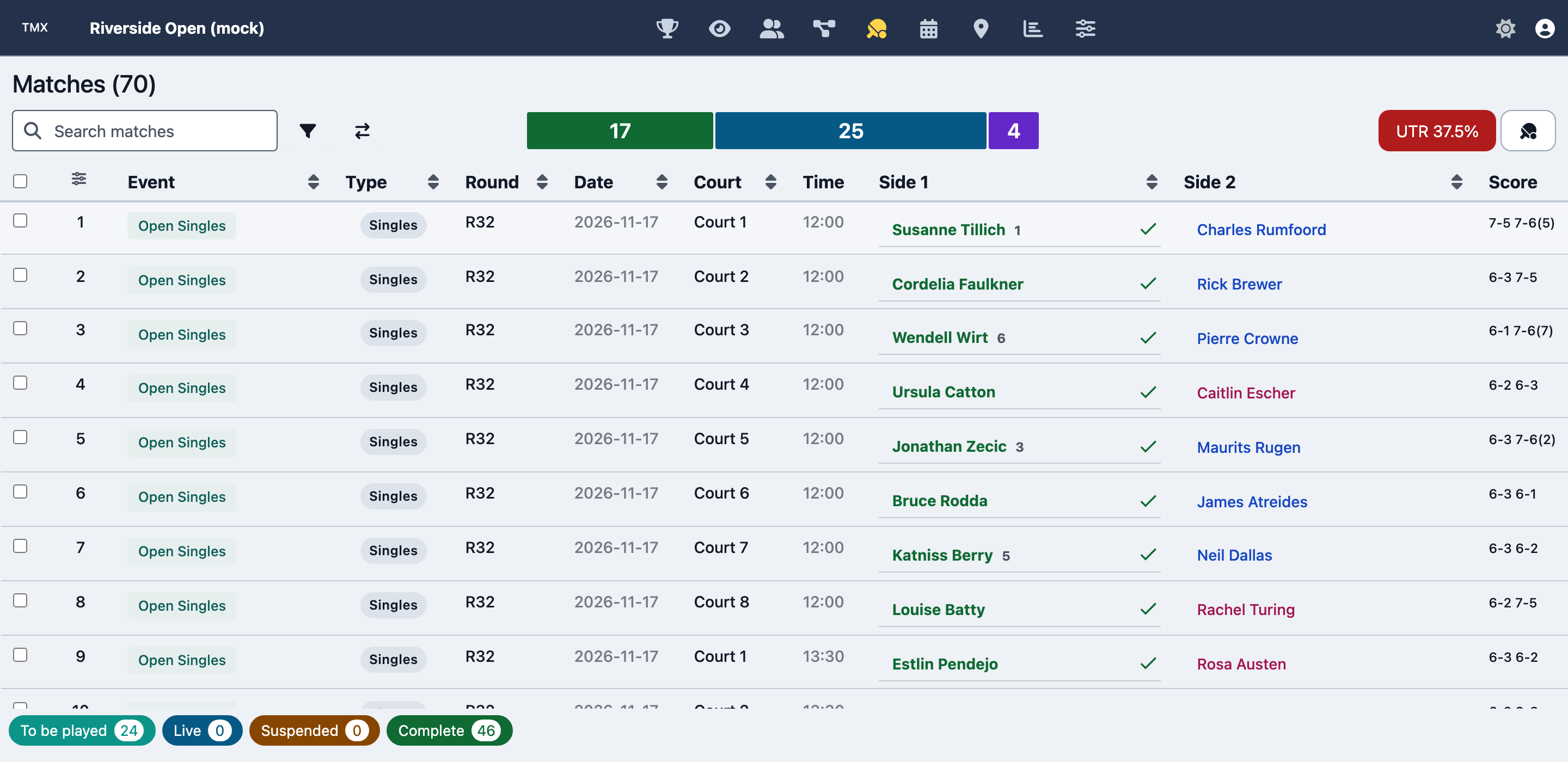
The MatchUps tab: every matchUp in the tournament with its event, round, scheduled date, court and time, both sides and the score. The winner of a completed matchUp is ticked, and the strip at the bottom counts matchUps by status.
The screenshots on this page show TMX running locally with a tournament generated by the factory's mocksEngine; every participant is a generated mock person.
Overview
MatchUp management in TMX includes:
- Match Listing - View all matches with filtering and sorting
- Live Scoring - Enter and update match scores
- Score Validation - Format-aware score validation
- Match Status - Manage match states (scheduled, in progress, completed)
- Match Formats - Flexible scoring formats
- Walkover/Retirement - Handle special match outcomes
- Score Display - Tournament-style score presentation
- Match Progression - Automatic winner advancement
Factory Methods Used
Retrieving MatchUps
// Get all matchUps for an event
const { matchUps } = tournamentEngine.allEventMatchUps({ eventId });

// Get matchUps for a draw
const { matchUps } = tournamentEngine.allDrawMatchUps({ drawId });

// Get matchUps for a round (getRoundMatchUps groups matchUps you pass it; it does not fetch them)
const { matchUps } = tournamentEngine.allTournamentMatchUps({
  matchUpFilters: { drawIds: [drawId], structureIds: [structureId], roundNumbers: [1] },
});

// Get specific matchUp
const { matchUp } = tournamentEngine.findMatchUp({
  eventId,
  matchUpId,
});
Setting Scores
TMX enters scores through the score entry dialog from
courthive-components (openScoreEntryDialog). The demo below
is that same component, running live in this page. On submit, the dialog reports an outcome in the shape
setMatchUpStatus reads, which is shown beneath the button.
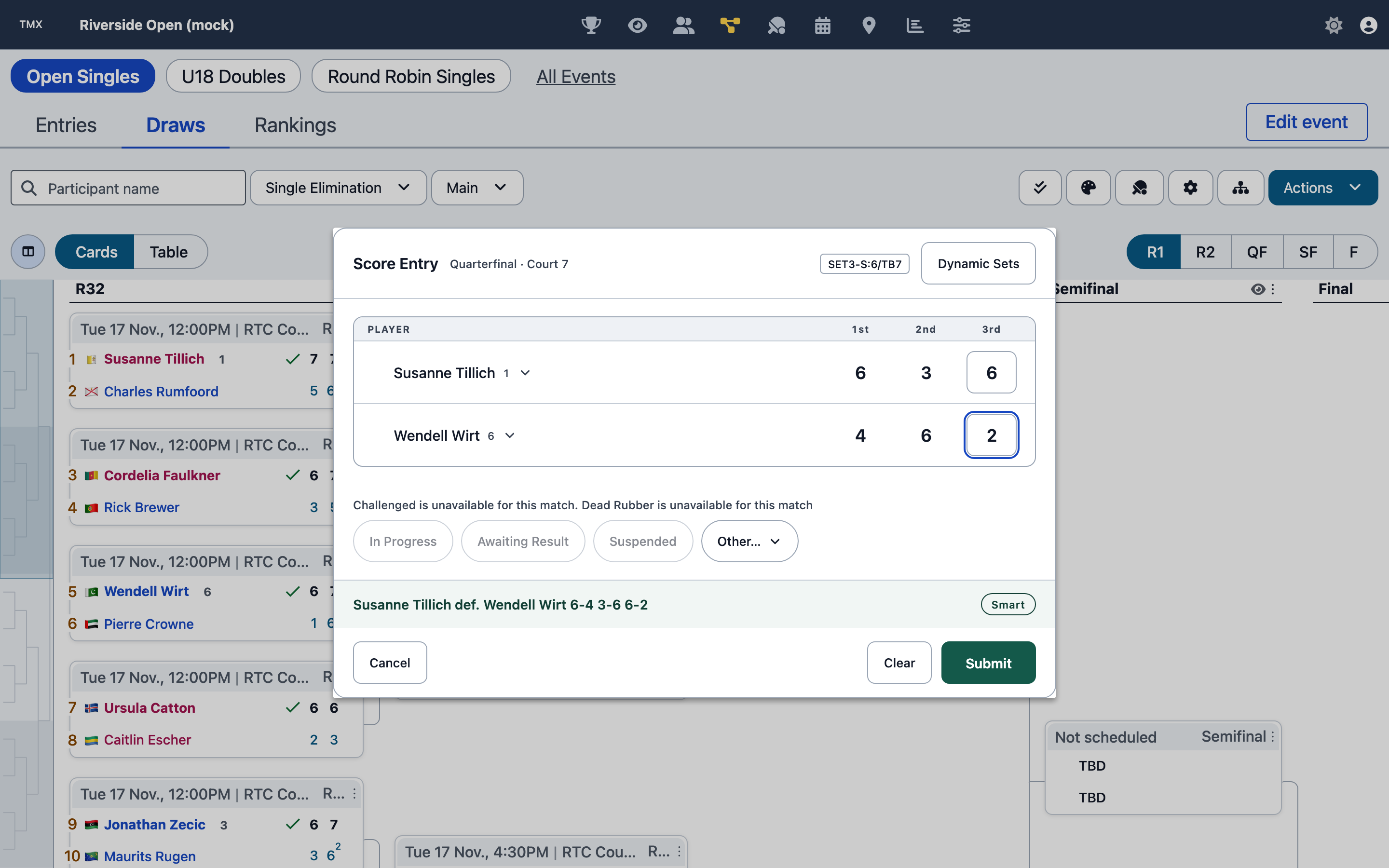
The same dialog in TMX, opened by clicking [Score] on a matchUp in a draw. The header carries the round, court and matchUpFormat; the band above the buttons states the result that Submit will record.
// Set match outcome with score
tournamentEngine.setMatchUpStatus({
  eventId,
  drawId,
  matchUpId,
  outcome: {
    score: {
      sets: [
        { side1Score: 6, side2Score: 4 },
        { side1Score: 6, side2Score: 3 },
      ],
    },
    winningSide: 1,
  },
});

// Score from string: outcome has no scoreString attribute (it would be ignored, and the matchUp completed with no
// score); build the outcome from the string first
const { outcome } = tournamentEngine.generateOutcomeFromScoreString({ scoreString: '6-4 6-3', winningSide: 1 });
tournamentEngine.setMatchUpStatus({ drawId, matchUpId, outcome });
Match Status Management
// Update match status: the status goes in the outcome (a top-level matchUpStatus is ignored)
tournamentEngine.setMatchUpStatus({
  drawId,
  matchUpId,
  outcome: { matchUpStatus: 'IN_PROGRESS' },
});

// Complete match with walkover
tournamentEngine.setMatchUpStatus({
  drawId,
  matchUpId,
  outcome: {
    matchUpStatus: 'WALKOVER',
    winningSide: 1,
  },
});

// Mark as retired
tournamentEngine.setMatchUpStatus({
  drawId,
  matchUpId,
  outcome: {
    matchUpStatus: 'RETIRED',
    winningSide: 1,
    score: {
      sets: [
        { side1Score: 6, side2Score: 2 },
        { side1Score: 3, side2Score: 5 },
      ],
    },
  },
});
Match Formats
// Set default format for event
tournamentEngine.setMatchUpFormat({
  eventId,
  matchUpFormat: 'SET3-S:6/TB7',
});

// Set format for specific structure
tournamentEngine.setMatchUpFormat({
  eventId,
  drawId,
  structureId,
  matchUpFormat: 'SET3-S:6/TB7',
});

// Set format for individual matchUp
tournamentEngine.setMatchUpFormat({
  eventId,
  matchUpId,
  matchUpFormat: 'SET1-S:8/TB7',
});
Match Format Codes
TMX supports flexible match format codes:
Standard Formats
'SET3-S:6/TB7'; // Best of 3 sets to 6 games, tiebreak to 7 at 6-6
'SET3-S:6/TB7@5'; // Best of 3, tiebreak played at 5-5 (@ sets where the tiebreak starts; the default is the set's games)
'SET3-S:6/TB7-F:TB10'; // Best of 3, final set a match tiebreak to 10
'SET1-S:8/TB7'; // 1 set to 8 games, tiebreak to 7 at 8-8
'SET5-S:6/TB7'; // Best of 5 sets
Timed Formats
'T20'; // a 20 minute timed match (short form)
'SET1-S:T25'; // a 25 minute timed set, long form
Pro Set
'SET1-S:8/TB7'; // Pro set to 8
'SET1-S:10/TB7'; // Pro set to 10
No-Ad Scoring
'SET3-S:6NOAD/TB7'; // Best of 3, no-ad games (NOAD qualifies the set, before the tiebreak)
Key Features
Score Entry
// Progressive score entry
const score = {
  sets: [],
};

// First set
score.sets.push({ side1Score: 6, side2Score: 4 });

// Second set with tiebreak
score.sets.push({
  side1Score: 7,
  side2Score: 6,
  side1TiebreakScore: 7,
  side2TiebreakScore: 5,
});

// Third set (if needed)
if (setsWon1 === 1 && setsWon2 === 1) {
  score.sets.push({ side1Score: 6, side2Score: 3 });
}

// Submit score
tournamentEngine.setMatchUpStatus({
  drawId,
  matchUpId,
  outcome: {
    score,
    winningSide: determinWinner(score),
  },
});
Score Validation
// Validate score matches format
const { valid, errors } = tournamentEngine.validateScore({
  matchUpFormat: 'SET3-S:6/TB7',
  score: {
    sets: [
      { side1Score: 6, side2Score: 4 },
      { side1Score: 7, side2Score: 5 },
    ],
  },
});

if (!valid) {
  console.error('Invalid score:', errors);
}
Match Progression
// Setting a score automatically:
// 1. Updates winner/loser
// 2. Advances winner to next round
// 3. Updates matchUp status
// 4. Triggers dependent matchUps
// 5. Updates standings (for Round Robin)

tournamentEngine.setMatchUpStatus({
  drawId,
  matchUpId,
  outcome: {
    score: {
      sets: [/* ... */],
    },
    winningSide: 1,
  },
});

// Check what matchUps are now ready
const { matchUps } = tournamentEngine.allEventMatchUps({
  eventId,
  matchUpFilters: { matchUpStatuses: ['TO_BE_PLAYED'] },
});
Special Outcomes
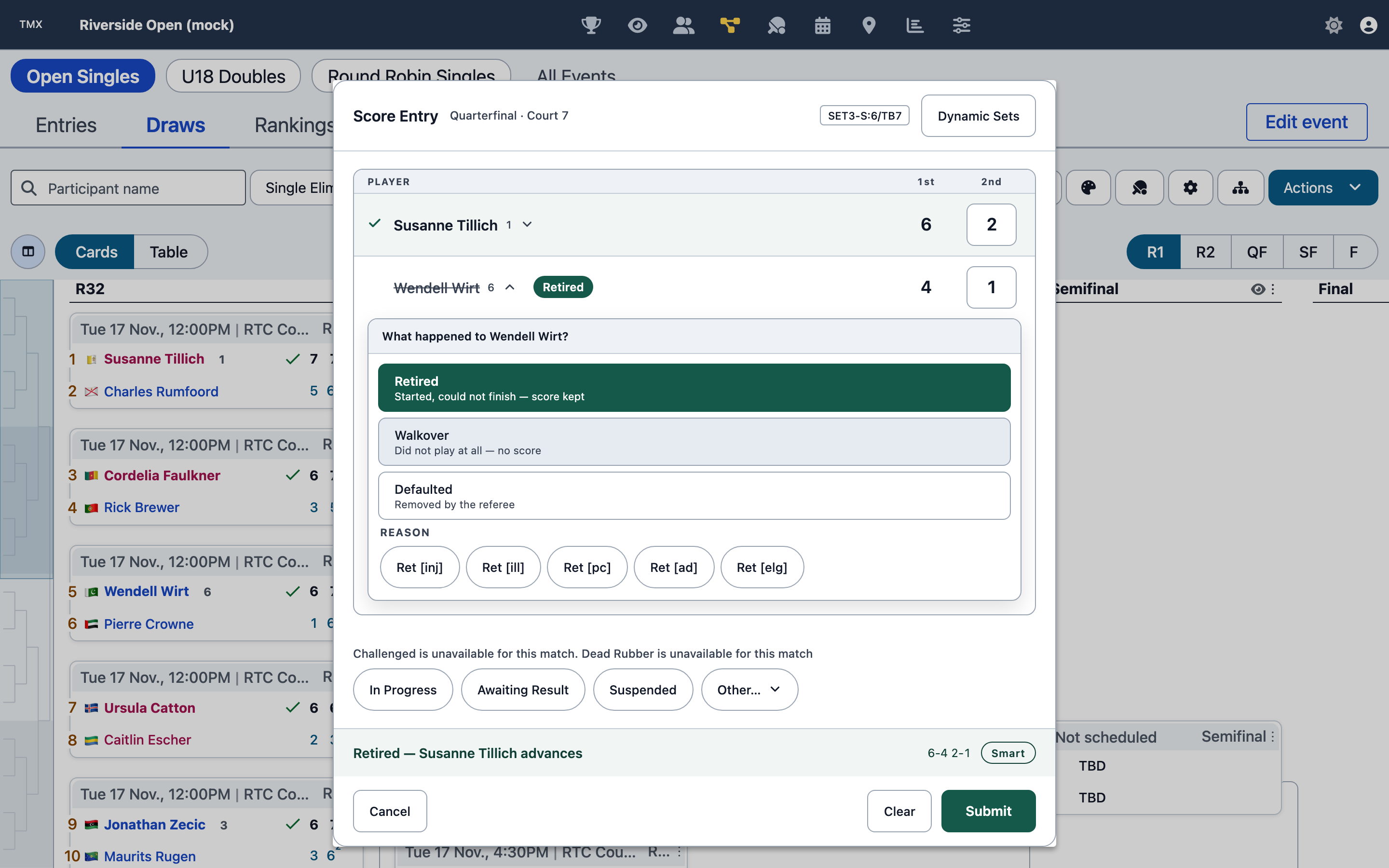
Clicking a player's name asks what happened to that side: Retired, Walkover or Defaulted. With a scoring policy that defines matchUpStatusCodes attached, a Reason row offers that policy's codes for the chosen status.
In factory 7.x the chosen reason is reported as outcome.matchUpStatusCodes. The codes come from the scoring
policy attached to the tournament or event; without one, the dialog draws no reason control. Try it in the
live demo above, which uses the factory's POLICY_SCORING_USTA fixture.
// Walkover
tournamentEngine.setMatchUpStatus({
  drawId,
  matchUpId,
  outcome: {
    matchUpStatus: 'WALKOVER',
    winningSide: 1,
  },
});

// Default
tournamentEngine.setMatchUpStatus({
  drawId,
  matchUpId,
  outcome: {
    matchUpStatus: 'DEFAULTED',
    winningSide: 1,
  },
});

// Double walkover
tournamentEngine.setMatchUpStatus({
  drawId,
  matchUpId,
  outcome: {
    matchUpStatus: 'DOUBLE_WALKOVER',
  },
});

// Retired
tournamentEngine.setMatchUpStatus({
  drawId,
  matchUpId,
  outcome: {
    matchUpStatus: 'RETIRED',
    winningSide: 1,
    score: {
      sets: [
        { side1Score: 6, side2Score: 2 },
        { side1Score: 3, side2Score: 4 }, // Score when retired
      ],
    },
  },
});
UI Components
TMX builds this tab from these courthive-components exports:
- openScoreEntryDialog - format-aware score entry
- renderScorecard - a team matchUp's scorecard
- getMatchUpFormatModal - a matchUp's format (see in docs)
- buildCompetitivenessBar and buildSegmentedBar - the competitiveness and status summaries above the table
- controlBar - the toolbar above the matchUps table
The matchUps table itself is a Tabulator grid in TMX's own code.
Common Workflows
Basic Score Entry
// 1. Get matchUp
const { matchUp } = tournamentEngine.findMatchUp({
  eventId,
  matchUpId,
});

// 2. Validate participants present
if (!matchUp.sides[0].participantId || !matchUp.sides[1].participantId) {
  console.error('MatchUp not ready for scoring');
  return;
}

// 3. Enter score
const score = {
  sets: [
    { side1Score: 6, side2Score: 4 },
    { side1Score: 6, side2Score: 3 },
  ],
};

// 4. Determine winner
const winningSide = score.sets.filter((s) => s.side1Score > s.side2Score).length > 1 ? 1 : 2;

// 5. Submit
const result = tournamentEngine.setMatchUpStatus({
  drawId,
  matchUpId,
  outcome: { score, winningSide },
});

// 6. Update UI
if (result.success) {
  refreshMatchUpDisplay();
}
Live Score Updates
// Update score during match
let currentScore = { sets: [] };

function updateSet(setNumber, side1Score, side2Score) {
  currentScore.sets[setNumber - 1] = { side1Score, side2Score };

  // Save intermediate state: a score with no winner leaves the matchUp IN_PROGRESS
  tournamentEngine.setMatchUpStatus({
    drawId,
    matchUpId,
    outcome: {
      matchUpStatus: 'IN_PROGRESS',
      score: currentScore,
    },
  });
}

function completeMatch(winningSide) {
  tournamentEngine.setMatchUpStatus({
    drawId,
    matchUpId,
    outcome: {
      score: currentScore,
      winningSide,
      matchUpStatus: 'COMPLETED',
    },
  });
}
Bulk Score Import
// Import scores from external source
const scores = [
  { drawId, matchUpId: 'match1', scoreString: '6-4 6-3', winningSide: 1 },
  { drawId, matchUpId: 'match2', scoreString: '7-6(5) 4-6 6-3', winningSide: 1 },
  { drawId, matchUpId: 'match3', scoreString: 'WO', winningSide: 1, status: 'WALKOVER' },
];

scores.forEach((s) => {
  const outcome =
    s.status === 'WALKOVER'
      ? { matchUpStatus: 'WALKOVER', winningSide: s.winningSide }
      : tournamentEngine.generateOutcomeFromScoreString({ scoreString: s.scoreString, winningSide: s.winningSide })
          .outcome;

  // a score that does not fit the matchUpFormat is refused: report it rather than skipping it silently
  const result = tournamentEngine.setMatchUpStatus({
    drawId: s.drawId,
    matchUpId: s.matchUpId,
    outcome,
  });
  if (result.error) console.error(s.matchUpId, result.error);
});
Score Correction
// Re-enter the correct score: a new outcome replaces the old one. Changing the winner is refused once the winner has
// played on; a corrected score with the same winner is not
tournamentEngine.setMatchUpStatus({
  drawId,
  matchUpId,
  outcome: {
    score: correctScore,
    winningSide: correctWinner,
  },
});

// Or remove the outcome altogether (the CLEAR_SCORE action's payload)
tournamentEngine.setMatchUpStatus({
  drawId,
  matchUpId,
  outcome: {
    matchUpStatus: 'TO_BE_PLAYED',
    score: { scoreStringSide1: '', scoreStringSide2: '' },
    winningSide: undefined,
  },
});
Filtering and Querying
// Get completed matches
const { completedMatchUps } = tournamentEngine.allEventMatchUps({
  eventId,
  matchUpFilters: {
    matchUpStatuses: ['COMPLETED'],
  },
});

// Get matches ready to play
const { readyMatchUps } = tournamentEngine.allEventMatchUps({
  eventId,
  matchUpFilters: {
    matchUpStatuses: ['TO_BE_PLAYED'],
    isMatchUpTie: false,
    readyToScore: true,
  },
});

// Get matches by round
const { matchUps } = tournamentEngine.allEventMatchUps({
  eventId,
  matchUpFilters: {
    roundNumbers: [1, 2],
  },
});

// Get matches for specific participant
const { matchUps } = tournamentEngine.allEventMatchUps({
  eventId,
  inContext: true,
  contextFilters: { participantIds: [participantId] }, // participantIds is a context filter
});
Statistics and Analysis
// Get match statistics
const { matchUpFormat, score } = matchUp;

// Calculate total games
const totalGames = score.sets.reduce((sum, set) => sum + set.side1Score + set.side2Score, 0);

// Check for tiebreaks
const tiebreaks = score.sets.filter((set) => set.side1TiebreakScore !== undefined).length;

// Match duration
const duration =
  matchUp.schedule?.endTime && matchUp.schedule?.startTime
    ? new Date(matchUp.schedule.endTime) - new Date(matchUp.schedule.startTime)
    : null;
Best Practices
Score Entry Best Practices
- Validate format before entry
- Check for tiebreak requirements
- Verify set completion before moving to next set
- Confirm winner determination logic
- Allow score preview before submission
Match Management
- Update status appropriately (SCHEDULED → IN_PROGRESS → COMPLETED)
- Handle special outcomes properly (WO, RET, DEF)
- Provide clear feedback on score submission
- Allow score corrections with audit trail
Performance
- Cache matchUp lists and filter in UI
- Use matchUp filters in queries
- Batch score updates when possible
- Minimize full matchUp queries
User Experience
- Show match format clearly
- Indicate tiebreak requirements
- Display running score during entry
- Confirm before submitting scores
- Allow easy correction of mistakes
Related Documentation
- Matchup Governor - All matchUp methods
- Score Governor - Scoring methods
- Match Formats - Format codes and configuration
- Match Status - Status values and meanings
Next Steps
After managing matches, proceed to Venues & Scheduling to assign matches to courts and create schedules.