Draw Generation and Management in TMX
The Draws interface in TMX provides comprehensive tools for generating, visualizing, and managing draw structures. This demonstrates the full power of the Draws Governor and related draw management methods.
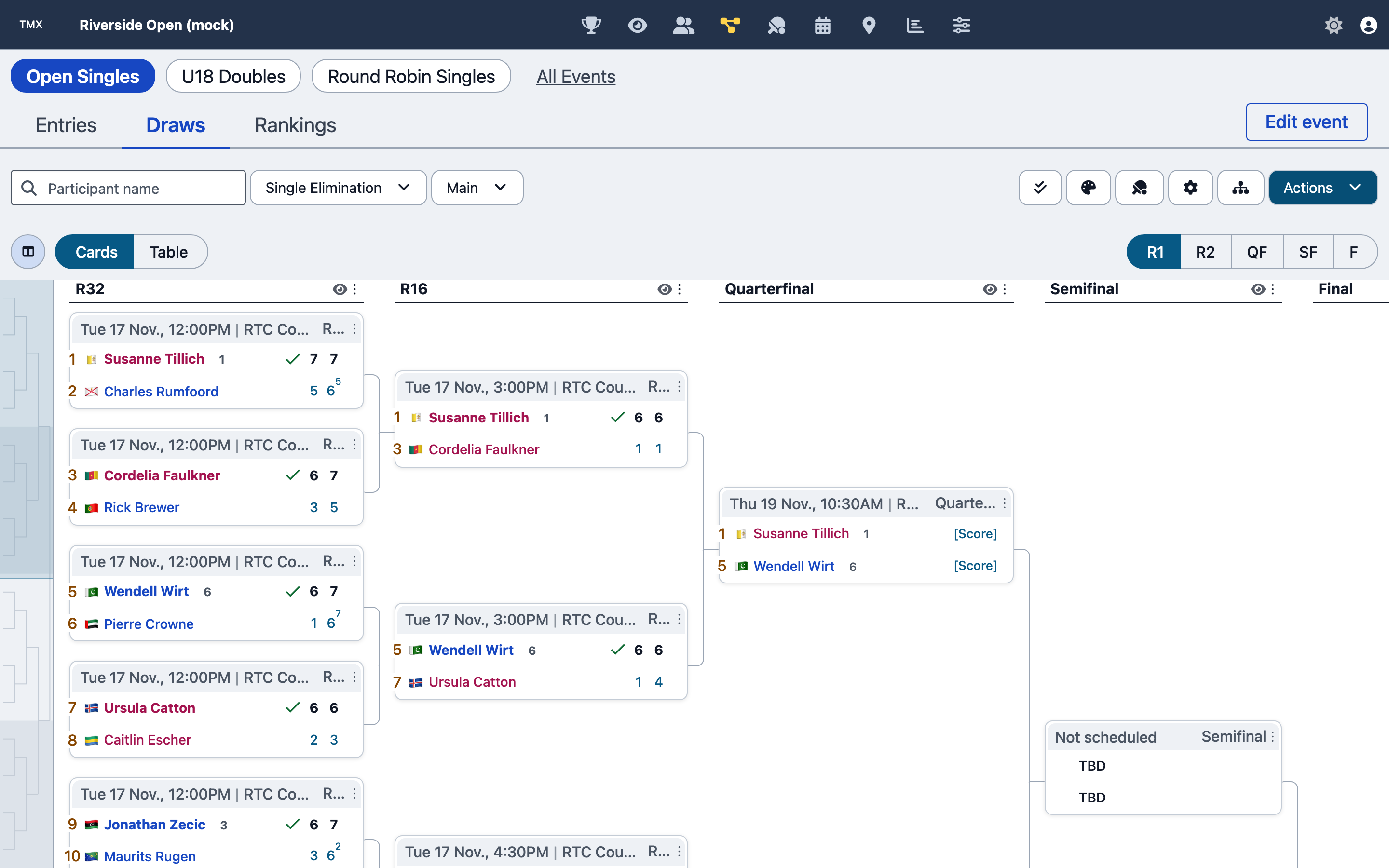
A 32-draw single elimination structure on an event's Draws tab. Completed matchUps show scores and a tick beside the winner; a matchUp that is ready to play shows [Score]. The round buttons at top right jump between rounds, and Cards / Table switches the layout.
The screenshots on this page show TMX running locally with a tournament generated by the factory's mocksEngine; every participant is a generated mock person.
Overview
Draw management in TMX includes:
- Draw Generation - Multiple draw types and formats
- Seeding - A seeding policy and seed count in the Configure draw drawer, plus manual seed overrides
- Position Assignment - Manual and automatic participant placement
- Byes Management - Automatic and manual bye placement
- Qualification - Qualifying draw integration
- Lucky Losers - Integration of qualifying players
- Bracket Visualization - Interactive draw display
- Draw Modification - Editing positions, swapping players, adding/removing participants
Factory Methods Used
These examples use factory engine methods. TMX's UI helpers are separate application code. A generated draw is returned to the caller; attach it explicitly before issuing mutations by draw ID.
Creating Draws
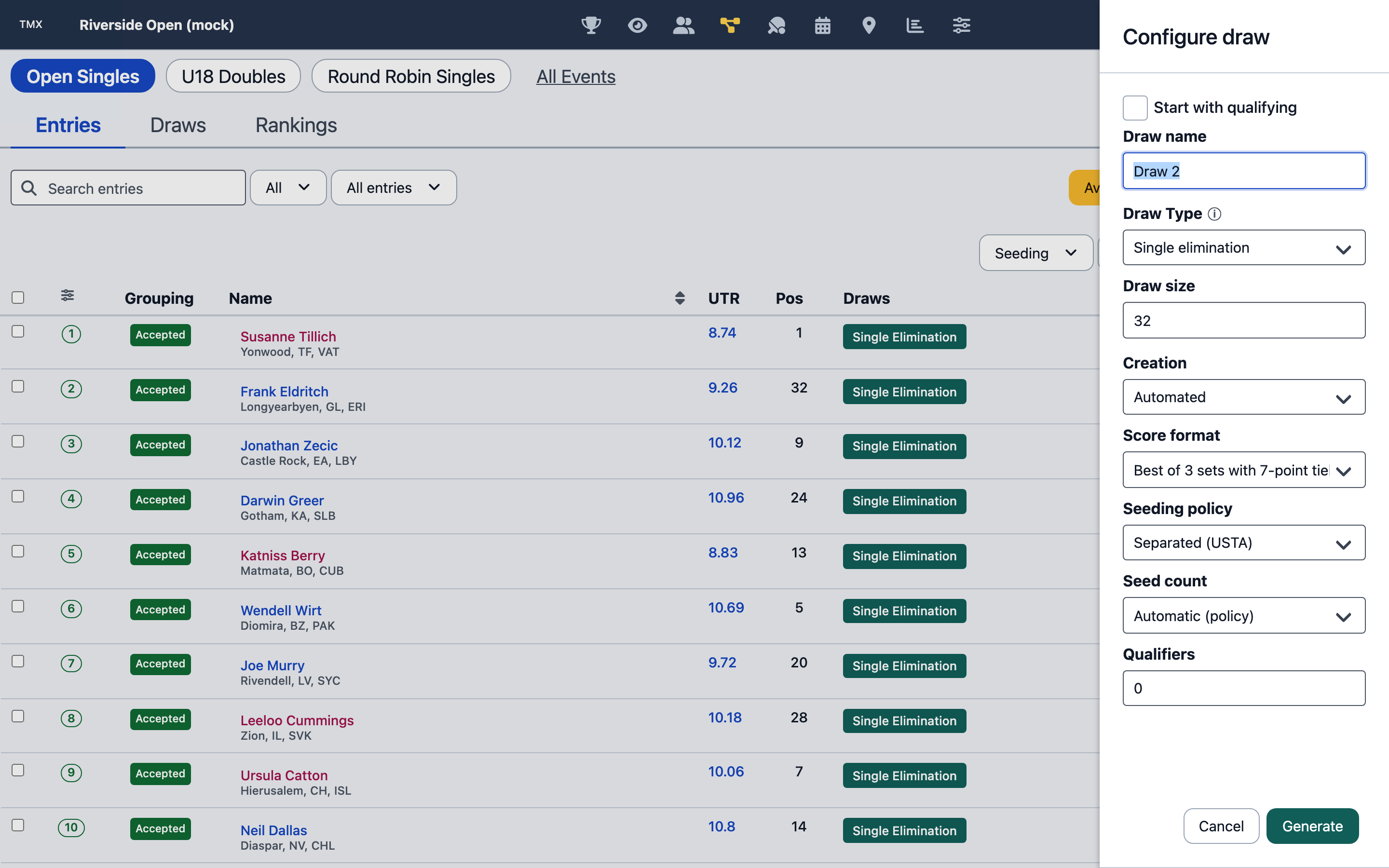
The Configure draw drawer, opened with Add draw from the Entries tab: draw name, draw type, draw size, automated or manual creation, score format, seeding policy, seed count and qualifiers. Generate creates the draw.
const { drawDefinition, error } = tournamentEngine.generateDrawDefinition({
  eventId,
  drawSize: 32,
  drawType: 'SINGLE_ELIMINATION',
  automated: false,
  seedsCount: 8,
});
if (error) throw new Error(error.message);
if (!drawDefinition) throw new Error('Draw generation failed');
const result = tournamentEngine.addDrawDefinition({ eventId, drawDefinition });
if (result.error) throw new Error(result.error.message);
const drawId = drawDefinition.drawId;
const structureId = drawDefinition.structures?.[0]?.structureId;
if (!structureId) throw new Error('Missing main structure');
Seeding Participants
// Set a displayed seed on an existing participant in this structure.
tournamentEngine.modifySeedAssignment({ drawId, structureId, participantId, seedValue: '1' });
// Position the seeded and unseeded entries using the chosen positioning policy.
tournamentEngine.automatedPositioning({ drawId, structureId });
seedNumber identifies an assignment; seedValue is its display value. For ranked automatic seeding,
see the Seeding Policy. Participant scale items are not seed assignments.
Position Assignment
for (const assignment of assignments) {
  const result = tournamentEngine.assignDrawPosition({ drawId, structureId, ...assignment });
  if (result.error) throw new Error(result.error.message);
}
Review position actions and errors before changing a draw in play.
Draw Types
TMX supports all factory draw types:
Single Elimination
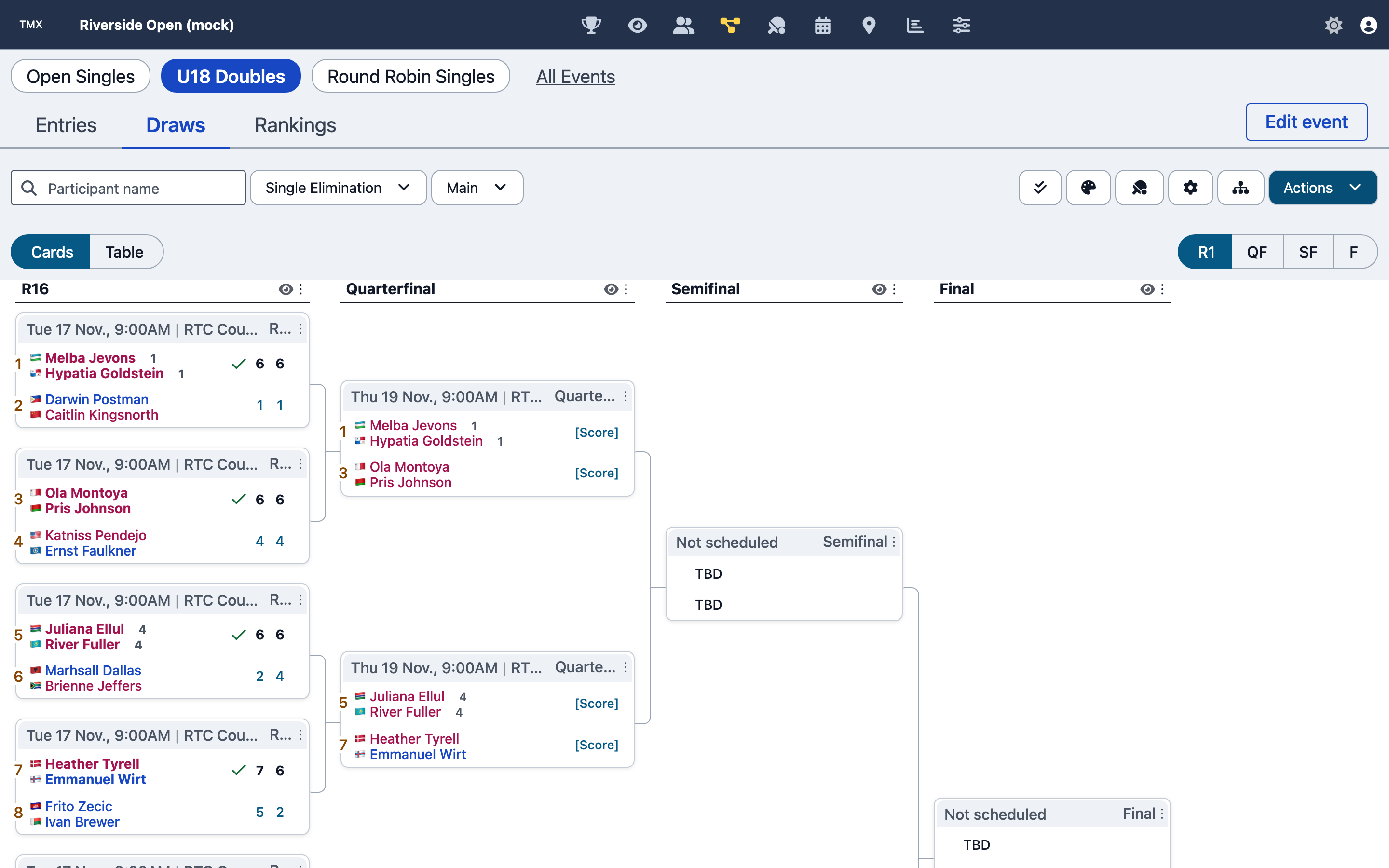
A 16-draw doubles single elimination structure: each side is a pair, seeded pairs carry their seed number, and the header of each matchUp shows its scheduled day, time and court.
{
  drawType: 'SINGLE_ELIMINATION',
  drawSize: 32,
  seedingProfile: 'WATERFALL'
}
Compass Draw
{
  drawType: 'COMPASS',
  drawSize: 16, // generates EAST (main), WEST, NORTH, SOUTH, … structures
}
Round Robin
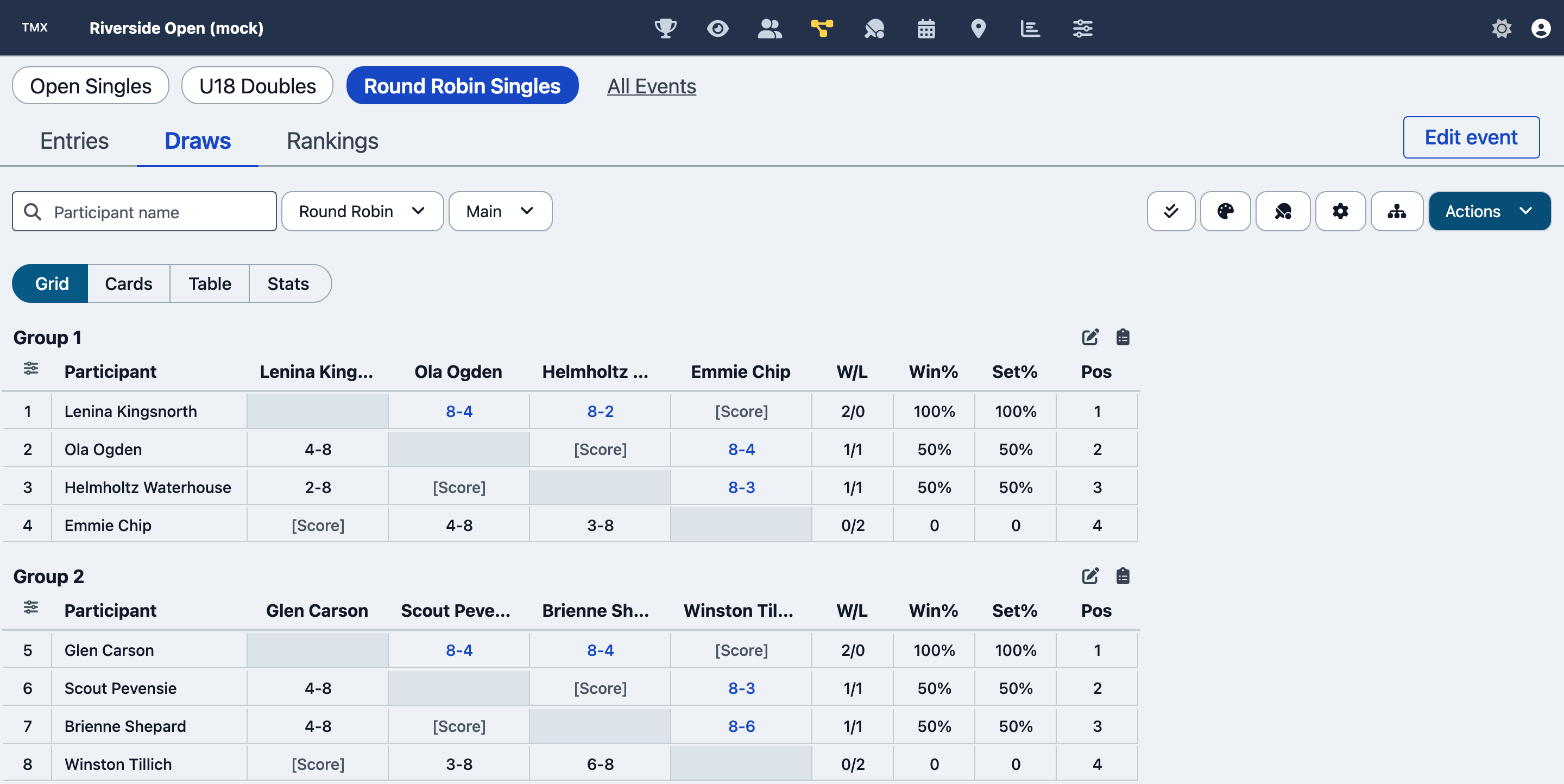
A round robin draw in Grid view: one results grid per group, with win/loss, win percentage, set percentage and group position columns. Unplayed cells show [Score]. Cards, Table and Stats are alternative views of the same structure.
{
  drawType: 'ROUND_ROBIN',
  drawSize: 8,
  structureOptions: { groupSize: 4 }, // a top-level groupSize is ignored
}
Feed-In Championship
{
  drawType: 'FEED_IN_CHAMPIONSHIP',
  drawSize: 32, // feed rounds alternate TOP_DOWN / BOTTOM_UP; a feed-in policy (policyDefinitions) changes that
}
Curtis Consolation
{
  drawType: 'FIRST_MATCH_LOSER_CONSOLATION',
  drawSize: 16
}
Modified Feed-In
{
  drawType: 'MODIFIED_FEED_IN_CHAMPIONSHIP',
  drawSize: 32
}
Seeding Profiles
These are the factory's seedingProfile values. TMX's Configure draw drawer exposes two of them through its Seeding policy select: Separated (USTA) is SEPARATE and Adjacent (ITF) is CLUSTER. A provider can lock the policy, and then the select offers only the provider's. WATERFALL is available through the factory API only.
Waterfall (Traditional)
{
  seedingProfile: 'WATERFALL',
  seedsCount: 8
}
// Seeds: 1, 2, 3-4, 5-8, 9-16, etc.
Separate
{
  seedingProfile: 'SEPARATE',
  seedsCount: 8
}
// Maximizes separation of seeds
Cluster
{
  seedingProfile: 'CLUSTER',
  seedsCount: 8
}
// Groups seeds in same section
Key Features
Automated Draw Generation
Complete draw generation in one call:
const result = tournamentEngine.generateDrawDefinition({
  eventId,
  drawSize: 32,
  drawType: 'SINGLE_ELIMINATION',
  seedingProfile: 'WATERFALL',
  automated: true,
  seedsCount: 8,
  matchUpFormat: 'SET3-S:6/TB7',
});

// Returns complete draw with:
// - Seeds positioned
// - Unseeded players positioned
// - Byes placed automatically
// - MatchUps created
Manual Draw Control
Generate with automated: false, attach the returned definition, then assign seeds and positions as
above. Use getPositionAssignments({ drawId, structureId }) to inspect empty, BYE and occupied slots.
Qualifying structures belong to the same draw; see Draw Links for the
link model and Draws Governor for qualifying attachment parameters.
Lucky Loser Assignment
Use position actions to discover which replacements are legal for a specific position. There is no draw-wide lucky-loser availability query.
const result = tournamentEngine.luckyLoserDrawPositionAssignment({
  drawId,
  structureId,
  drawPosition,
  luckyLoserParticipantId: participantId,
});
if (result.error) throw new Error(result.error.message);
UI Components
TMX builds this tab from these courthive-components exports:
- renderStructure and renderContainer - the bracket and round robin displays
- TopologyBuilderControl - the draw builder, where a draw's structures and links are designed before generation
- getMatchUpFormatModal - the score format chosen in the Configure draw drawer
- mountRoundProfileEditor - the number of matchUps in each round, for the draw types that take a round profile
- buildDrawCard and mapDrawDefinitionToCardData - the draw cards
- buildStructureMinimap - the overview of a draw's structures
The Configure draw drawer itself is TMX code built with renderForm; it is a single drawer, not a wizard.
Common Workflows
Complete Draw Generation
const { event } = tournamentEngine.getEvent({ eventId });
const mainEntries = (event.entries ?? []).filter((entry) => entry.entryStage === 'MAIN');
const drawSize = Math.max(2, 2 ** Math.ceil(Math.log2(mainEntries.length || 1)));
const { drawDefinition, error } = tournamentEngine.generateDrawDefinition({
  eventId,
  drawSize,
  drawType: 'SINGLE_ELIMINATION',
  automated: true,
  seedsCount: Math.min(8, Math.floor(drawSize / 4)),
  matchUpFormat: 'SET3-S:6/TB7',
});
if (error) throw new Error(error.message);
if (!drawDefinition) throw new Error('Draw generation failed');
tournamentEngine.addDrawDefinition({ eventId, drawDefinition });
The UI must select the intended entry statuses/stage and seeds before generation. Preview the returned definition before replacing a published or already-played draw.
Draw Modification
// Swap two participants
tournamentEngine.swapDrawPositionAssignments({
  eventId,
  drawId,
  structureId,
  drawPositions: [1, 32], // Swap positions 1 and 32
});

// Remove participant and replace with bye
tournamentEngine.removeDrawPositionAssignment({
  eventId,
  drawId,
  structureId,
  drawPosition: 5,
});

tournamentEngine.assignDrawPositionBye({
  eventId,
  drawId,
  structureId,
  drawPosition: 5,
});

// Add alternate to draw
tournamentEngine.alternateDrawPositionAssignment({
  eventId,
  drawId,
  structureId,
  drawPosition: 10,
  alternateParticipantId: alternateId,
});
Multi-Flight Draw Generation
// Get flight profile
const { flightProfile } = tournamentEngine.getFlightProfile({ eventId });

// Generate draw for each flight
flightProfile.flights.forEach((flight) => {
  // Get entries for this flight
  const flightEntries = getFlightEntries(eventId, flight.flightNumber);

  // Generate draw
  tournamentEngine.generateDrawDefinition({
    eventId,
    drawSize: flight.drawSize,
    drawType: 'SINGLE_ELIMINATION',
    seedingProfile: 'WATERFALL',
    automated: true,
    drawName: flight.flightName,
  });
});
Draw Queries
// Get all draws for event
const { event } = tournamentEngine.getEvent({ eventId });
const drawDefinitions = event.drawDefinitions ?? [];

// Get specific draw details
const { drawDefinition } = tournamentEngine.getEvent({
  eventId,
  drawId,
});

// Get draw structure
const { structures } = tournamentEngine.getDrawStructures({
  eventId,
  drawId,
});

// Get position assignments
const { positionAssignments } = tournamentEngine.getPositionAssignments({
  eventId,
  drawId,
  structureId,
});

// Check draw validity
const { valid, inconsistencies, error } = tournamentEngine.getDrawInconsistencies({
  eventId,
  drawId,
});
Best Practices
Draw Planning
- Calculate appropriate draw size (next power of 2)
- Consider bye placement for smaller fields
- Plan seeding before generation
- Decide on seeding profile based on competition level
Seeding
- Use rankings/ratings when available
- Apply federation seeding rules
- Validate seed counts (typically 25-33% of draw size)
- Separate seeds appropriately
Generation Strategy
- Use automated generation when possible
- Manual construction for special requirements
- Test draw validity before finalizing
- Provide preview before commitment
Modification Caution
- Avoid changes after play begins
- Document all manual changes
- Validate draw after modifications
- Check matchUp integrity after swaps
Performance
- Generate draws in batches for multiple events
- Cache draw definitions
- Use efficient queries for position data
- Minimize regeneration operations
Related Documentation
- Draws Governor - All draw-related methods
- Draw Concepts - Draw types and structures
- Seeding Concepts - Seeding policies and profiles
- Position Actions - Valid position operations
Next Steps
Once draws are generated and finalized, proceed to MatchUps to manage scoring and match progression.